Showing posts with label Windows 10. Show all posts

Friday, 28 July 2017

Pro Tip: Beware of the Aftermarket Video Cards with Secure Boot


If you have some older video cards in your environment, you might not realize until deployment time that some of your systems will fail to display video or Windows will simply not use the card at all. The root cause of the is due to older video cards not being Secure Boot compatible. To fix the issue, you have three paths that are all valid, but I believe have to be evaluated carefully.

The first option is to remove the video card that wasn't supplied by the hardware vendor of the motherboard and use the onboard video. In some cases, this might be satisfactory, but depending on your needs you may need to look at another option such as disabling Secure Boot in the BIOS. Disabling secure boot is cheap but will not protect your system against malware that infects the boot environment of your machine, so you have to question the value of such an approach in an enterprise environment.

A more expensive approach would be to modernize your hardware, this could be as simple as giving the user a new PC because at this point with Windows 10 most enterprise hardware that currently has Secure Boot capability. The other choice is to replace the display card, but before buying that display card, you should evaluate the cost of a new card on hardware with a limited remaining lifespan versus purchasing a new system.

If you need to upgrade many machines, it might make more long term value to get these systems out of your fleet rather than taking a reduced security posture or buying new hardware for a device that may only be in the fleet for another year. To make an informed decision use tools such as System Center Configuration Manager to determine the affected systems through hardware inventory data it can capture. To me, secure boot is a no brainer that enterprises should enable by default with Windows 10.


Thursday, 6 April 2017

Windows 10 Creators Update (1703) Available for Download!

The Windows 10 Creators Update has hit current branch but will not be available via Windows Update until April 11, 2017. What this means for customers/enthusiasts that want to start using this release of Windows 10 they need to go out to the Windows 10 download site to get the latest release. This installation is driven by the upgrade assistant where you can create media or perform the in-place upgrade to Windows 10 1703.

For enterprise customers and developers, the ISO media for Windows 10 1703 can be found on your volume licensing site or MSDN. If you are building Windows images for deployment be sure to update your ADK environment to 1703 as well hosted over in the hardware developer center. There has been some news about potential issues with the new ADK so review the following blog articles by MVP Mikael Nystrom:


OS Deployment – Installing ADK 1703 on Windows Server 2016 could fail
https://deploymentbunny.com/2017/04/06/os-deployment-installing-adk-1703-on-windows-server-2016-fails/

OSD – App-V tools are missing in ADK 1703 when being installed on Windows Server 2016 (sometimes)
https://deploymentbunny.com/2017/04/06/osd-app-v-tools-are-missing-in-adk-1703-when-being-installed-on-windows-server-2016/

Need to know what is new with 1607 for IT Pros?
No problem, Microsoft has published documentation over here.
https://technet.microsoft.com/itpro/windows/whats-new/whats-new-windows-10-version-1703

New Windows 10 IoT Core Images Available!

Today Microsoft has released a set of images for running Windows 10 IoT core on the Rasberry PI, DragonBoard, and MinnowBoard MAX. The announcement had me interested in what the capabilities of the platform would be since I usually end up managing devices through Configuration Manager and/or Intune.

First, let's start off with what this version of Windows is meant for. The Windows 10 IoT Core edition is the smallest footprint of Windows 10 available for devices. If you look at the infographic below, you can see that Windows 10 IoT comes in many flavors with different levels of functionality. Essentially the Windows 10 IoT Core version of Windows 10 is intended for single purpose use cases. There is no Windows shell and no command prompt, but you do get the ability to run Universal Windows Platform applications. Win32 applications are still supported, but they will not output to the console.
Many may wonder what is the point to running Windows under such limited circumstances, but I believe there are some very valid use cases that should be considered. There obviously is the hobbyist market, and though Linux is currently the dominant platform, some developers may feel more comfortable using a pure Microsoft stack to build out their custom creations. The other side is the business market where you want an IoT device that leverages existing developer expertise in the Microsoft stack and has integration into Intune or System Center Configuration Manager to provide updates and management of these devices.

When I first started looking IoT, I saw management and security taking a back seat, but as I've witnessed in the news, this lack of care and feeding has created security and operational issues. IoT was overlooked at being too basic and non-business critical to be on the radar for many organizations but now that these devices are being infected with malware, spyware and participating in BotNets all of a sudden the need for management has become a clear requirement for not just businesses but consumers as well.

It will be interesting to see where the smallest of the Windows 10 IoT editions finds itself in the marketplace but I am hesitant to write it off as a hobbyist product because of the integrated management, the ability to continue using Visual Studio and integrate your solution with Azure's IoT Suite. If you are looking for the latest releases of IoT core I've put a set of links below so you can start downloading them right away!

Rasberry Pi 2 & 3
https://www.microsoft.com/en-us/download/details.aspx?id=55029&WT.mc_id=rss_windows_allproducts

DragonBoard
https://www.microsoft.com/en-us/download/details.aspx?id=55027&WT.mc_id=rss_windows_allproducts

MinnowBoard MAX
https://www.microsoft.com/en-us/download/details.aspx?id=55026&WT.mc_id=rss_windows_allproducts


Friday, 30 December 2016

Sequencing with App-V on Windows 10 Enterprise


The holidays are almost over, but I have been busy with many little side projects. I've meant to produce some instructional videos for years, and I finally got around to making something. I've been teaching App-V since the SoftGrid days and maintain a set of courseware with fellow MVP Tim Mangan.

My first video is a simple overview of sequencing a simple application. In these 15 minutes, you should have enough information to get a quick primer as to how to sequence an application on using App-V 5.1 on Windows 10 build 1607.


I hope you find the video useful and I hope to produce some more. In my next video, I will cover running the sequenced application on a Windows 10 1607 client.

Saturday, 23 January 2016

How do I Force an Intune Policy Sync on Windows 10

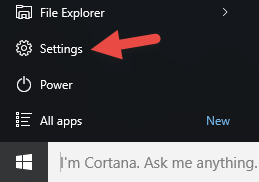
When testing or trying to resolve an issue the default sync settings with Intune can be lacking. If the device is enrolled the initial behavior is every 3 minutes for 30 minutes, and then every 24 hours. If a policy or application is sent to the device Intune will try to notify the device within five minutes, otherwise the device should check in every 24 hours. To force the policy sync on a device open the Start menu and select Settings.


Select Accounts.

Select Work access then the organization you are subscribed to. At this point there should be additional buttons that appear below. Click the sync button to do a policy synchronization with Intune.

To get more information about the sync action you can click the Info button.

You can see if the last sync was successful, when the last sync was successful and the last attempted sync. The URL of the management server being used is also displayed.


Wednesday, 6 January 2016

Intune Entrollment Error: System policies prevent you from connecting to a work or school account.

I had some fun getting to the bottom of this error and I found some potential issues that can cause this error to pop up that might not be apparent. We had the Azure AD user account configured for Azure AD Join and the user was not over the limit of devices they could enroll (default 5). We wanted to enroll the device into Intune using the following procedure. First open the Settings menu from the Start menu.


 Select Accounts.

Then select Work access and notice the error under Enroll in to device management.

What we did run into is two items that were generating the error.
  1. Don't perform Azure AD Join with the default administrator account.
  2. To enroll in Intune make sure the user performing Azure AD Join on the device is a local administrator.
Also make sure the machine is not domain joined and when the user enrolls the device into Azure AD they do not become a local administrator unless they were one to begin with. If the proper conditions are met the device enrollment dialog should have a plus sign to begin the enrollment process.

You will be asked to supply your Azure AD logon ID then click Continue.

Put in your password then click Sign in.

If two factor authentication is set up the follow page will appear. Select Set it up now to continue.

In this example I set my country to Canada then configured the system to send me a text message to the phone number I have configured previously for two factor authentication. I will click Contact me to continue the verification process.

I will enter in the security code sent to my cell phone then click Verify.

Now that I am authenticated I can select Done to complete the process.


You should now see your enrollment details in the Settings menu.

Hope this helps your experience go
a little more smoothly.